Help center

Frequently asked questions

Web push notifications have browser rules and platform nuances. Here is everything you need to know about Nezuko Web Push.

Browsers

Quirks that come from the browser, not from Nezuko.

Why don't notifications show up in Brave?

Brave disables Google's push service by default because it routes through Google servers. Users have to enable it manually in Brave settings → Privacy and security → turn on 'Use Google services for push messaging'. After enabling, restart the browser. Until this toggle is on, Brave silently refuses to subscribe — there is nothing any web push service can do server-side.
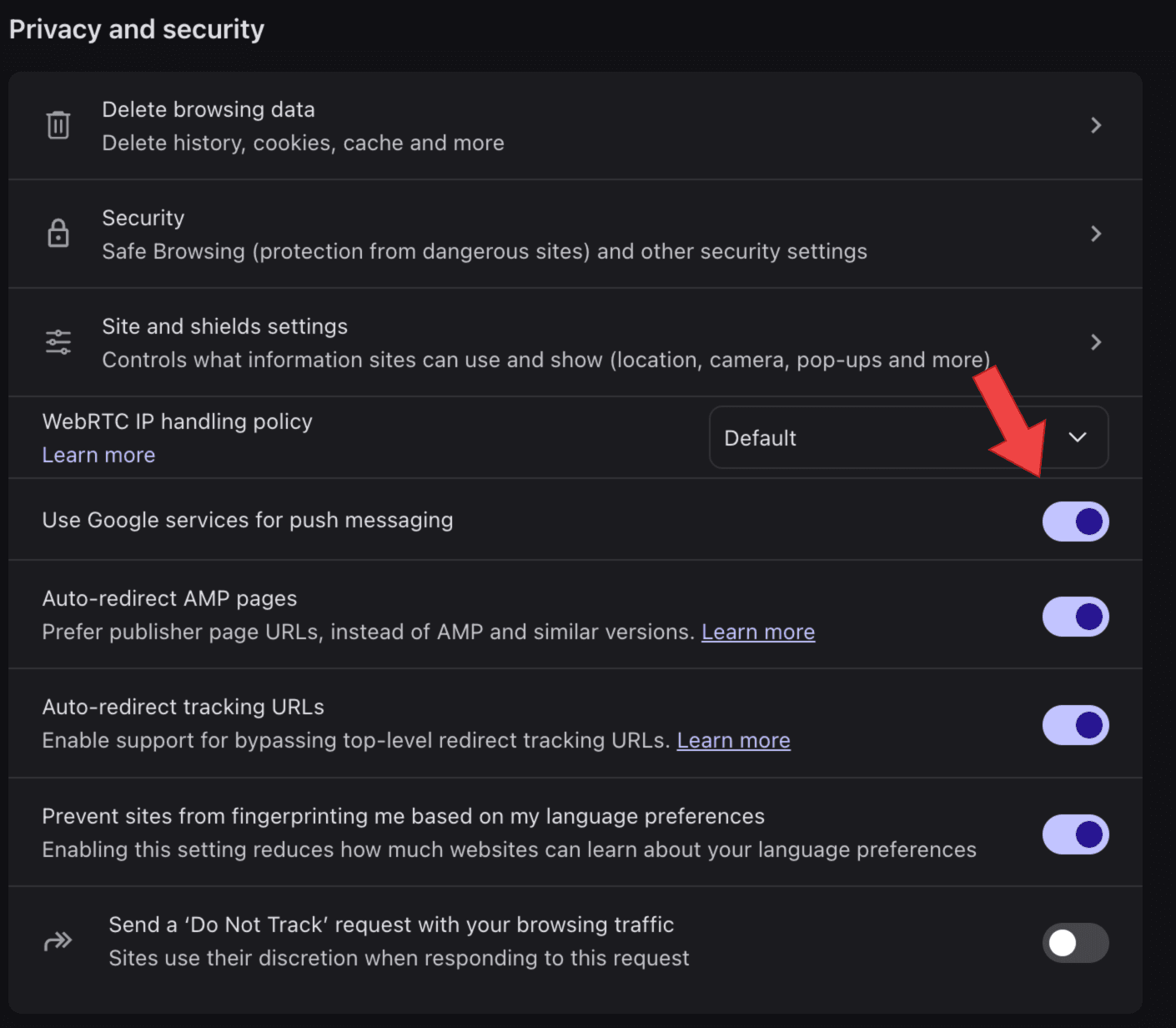
Brave settings — enable Use Google services for push messaging
brave://settings/privacy → Use Google services for push messaging

Why doesn't the notification icon show on Safari?

Safari ignores the icon field in the push payload. It uses the icons declared in your site's Web App Manifest instead — specifically the largest PNG in the icons[] array of your /manifest.json. Fix: add a manifest.json with a 192×192 (or larger) PNG icon, and link it from every page with <link rel="manifest" href="/manifest.json">. Chrome, Firefox, and Edge use the payload icon; Safari doesn't.

Why don't notifications work at all on iOS?

Web push on iOS Safari only works if the user installs your site to their home screen first (Share → Add to Home Screen). Regular Safari tabs cannot receive push. This is an Apple platform restriction. Once installed as a PWA, push works normally through APNs.

Why don't notifications work in private / incognito windows?

Chrome, Firefox, and Safari all refuse to register service workers or push subscriptions in private browsing mode. The subscribe prompt may appear but silently fail. This is by design in every browser.

Setup

Adding sites and making the snippet work.

Why can't I add an http:// site?

Web push requires HTTPS. Browsers will not register a service worker on http:// pages (localhost is the only exception, for development). This is a browser security rule, not a Nezuko policy.

The user clicked 'Allow' but they don't appear in Subscribers. Why?

A few common causes: (1) the site is not served over HTTPS, (2) the nezuko-sw.js file isn't reachable at the site root (open yoursite.com/nezuko-sw.js — it must return JavaScript, not your SPA's index.html), (3) an existing service worker is blocking Nezuko's registration, (4) the browser silently blocked the subscription (Brave, private mode). Open DevTools → Application → Service Workers to inspect.

Why do I have to upload nezuko-sw.js? Can't the script do everything?

Browsers only allow a service worker to be registered from the same origin as the page. That's a hard security rule — a service worker at nezukoo.vercel.app can't be installed on yoursite.com. So the SW file has to live at yoursite.com/nezuko-sw.js. Every push notification service (OneSignal, Pushly, etc.) has the same requirement. It's a one-time file upload.

How do I test that push is working?

Add your site, install the snippet, load your site in a normal (non-private) window, click Subscribe. You should appear in Subscribers immediately. Then open the Compose tab and send a test. If nothing arrives, check DevTools → Application → Service Workers → Push.

Can two accounts add the same site?

Technically yes. But only one can actually collect subscribers, because a browser can only register one service worker per scope. Whichever snippet loads first wins. In practice, the real site owner controls what runs on their domain.

Delivery

What happens after you hit Send.

Do notifications work when the user's browser is closed?

On desktop: only if the browser has a background process (Chrome/Edge usually do on Windows; Firefox doesn't by default; Safari does via macOS). On Android: yes, always — the OS wakes the browser. On iOS PWA: yes, delivered by APNs.

How long can a notification take to arrive?

Usually under 5 seconds. Push services (FCM/Mozilla/Apple) may delay or batch delivery to save battery, especially on mobile with the screen off. Nezuko sets a 24-hour TTL — if the device is offline that long, the notification is dropped.

Why did some notifications fail in the send response?

Most common reasons: (1) the subscription expired — browsers rotate keys periodically, (2) the user cleared site data or uninstalled the browser, (3) the push service is temporarily rejecting. Nezuko auto-removes subscribers whose endpoints return 404 or 410 (permanently gone). Transient failures aren't removed.

Why is my 'Sent' count higher than my subscriber count?

Sent counts every notification you've dispatched over the lifetime of the site. Subscribers is the current live count. If someone unsubscribes or their endpoint goes stale, they're removed from Subscribers but their historical delivery still counts.

Account & data

How Nezuko treats your account and what it stores.

I lost my 16-digit code. Can I recover it?

No. Nezuko stores only a salted hash of your code — the original digits are never saved. There is no email, phone, or backup. If you're still signed in, use the 'My code' button in the header to view it. If you're signed out with the code lost, the account and all its sites are permanently unreachable. Just create a new account and re-add your sites — you keep control of your domain, so re-verification is trivial.

How many notifications are kept in history?

Only the last 10 per site, to keep the database lean. Older ones are automatically deleted. Lifetime totals (Sent, Attempted, Delivered) are preserved as counters — those don't lose accuracy.

Does Nezuko track my visitors?

No. The embed script only registers a service worker and prompts for push permission. No analytics, no fingerprinting, no cookies, no third-party requests except to the browser's own push service (FCM/Mozilla/Apple) when a user subscribes.

Still stuck?

Most web push weirdness comes from the browser, not from Nezuko. If you hit something that isn't here and it feels like a real bug, it probably belongs on this page — let us know.